Start selling with a menu that already fits your restaurant
Typing a menu from scratch takes days. After you sign up, pick one of 14 ready menus for your type of business, see every dish and price before you load it, and have a working till in minutes. Then change the names and prices to yours.
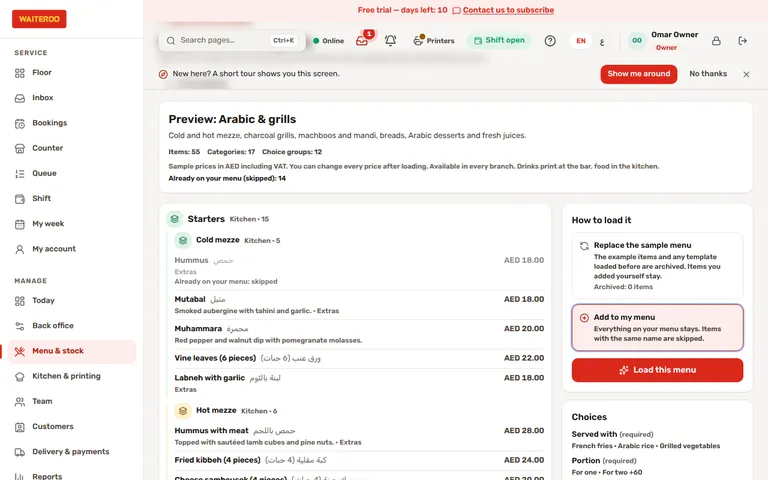
A ready menu for the way you trade
Café, bakery, juice and desserts
Coffee shop, bakery, juice bar and dessert shop: espresso and iced coffee, manakish and croissants, fresh juices, kunafa, waffles and cakes.
Fast food
Burger joint, pizzeria, shawarma, fried chicken and sandwich shop, with meals, sizes and sides ready to sell.
Restaurants
Arabic and grills, Indian and Pakistani, Asian, and international casual dining, from mezze and tandoor to wok dishes and steaks.
Cafeteria and karak
Karak and tea, fresh juices, sandwiches and parathas for a UAE cafeteria that serves the counter and the cars outside.
More than a list of dishes
Each ready menu holds 33 to 55 dishes, sorted into categories and sub-categories, with the sizes, add-ons and meals a guest expects. Names and descriptions are in English and Arabic, so your till, receipts, kiosk and QR menu speak both from the first day.
- Prices to start from — typical UAE prices in AED with VAT included. If your menu prices exclude VAT, they are adjusted so the guest still pays the round price; if you are not VAT registered, they stay as they are.
- Kitchen and bar — dishes go to your kitchen station and drinks to the bar, or to the kitchen if you have no bar, in every branch.
- Quick notes — ready-made notes such as “No onion” or “No ice”, in English and Arabic.
- Courses — set on the categories on Pro and Premium, so starters go before mains.
See it first, keep what is yours
The owner or a manager opens a ready menu from the setup wizard or from Menu › Load a template, and sees every dish, price and choice before loading. Then choose how to load it:
- Add to my menu — everything you already have stays; a dish with the same name is skipped.
- Replace the sample menu — swaps the example dishes a new till starts with. It is offered only before your first real sale, and never touches dishes you added yourself.
- Load again safely — loading the same menu twice never creates duplicates.
- Make it yours — rename dishes, change prices and descriptions, or remove what you do not sell, as with any menu.
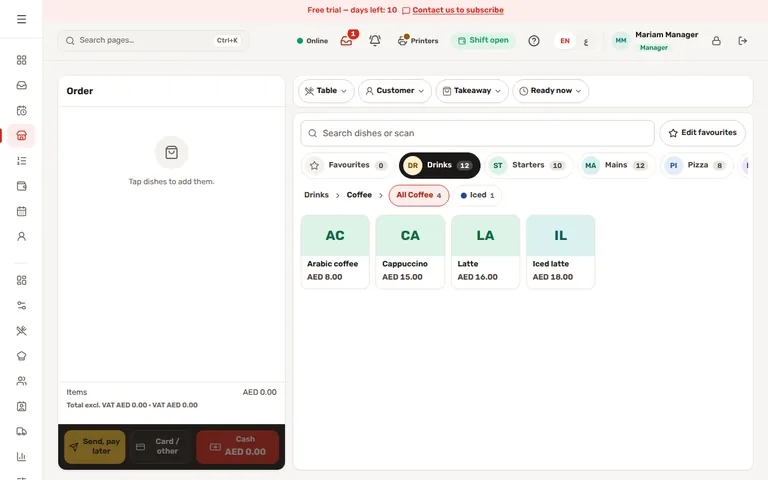
Organise a big menu in levels
Put a category inside another, as many levels deep as you need: Drinks › Coffee › Iced. Give each one a colour, move it or change the order. Menu hours, kitchen routing and quick notes set on a category pass down to its sub-categories.
- On the till — tap a category to see all its dishes, then narrow them with the second row.
- In reports and promotions — a category’s sales and offers include its sub-categories.
- On the QR menu — guests see the same sections, with a second row for the sub-categories.
Questions and answers
Which plans include the ready menus?
Are the prices right for my restaurant?
I already have my menu in Excel. Do I need a ready menu?
Will loading a ready menu delete my dishes?
Try Waiteroo in your restaurant free for 14 days
No card needed. Set it up yourself or let our team do it, and ask us anything on WhatsApp.