One till for the tables, the counter and takeaway
Waiteroo is a point of sale for restaurants and cafés in the UAE. Seat a table and keep its tab open, ring up a takeaway at the counter, and print a bilingual VAT receipt when the guest pays. It runs in the browser on the tablets and computers you already have.
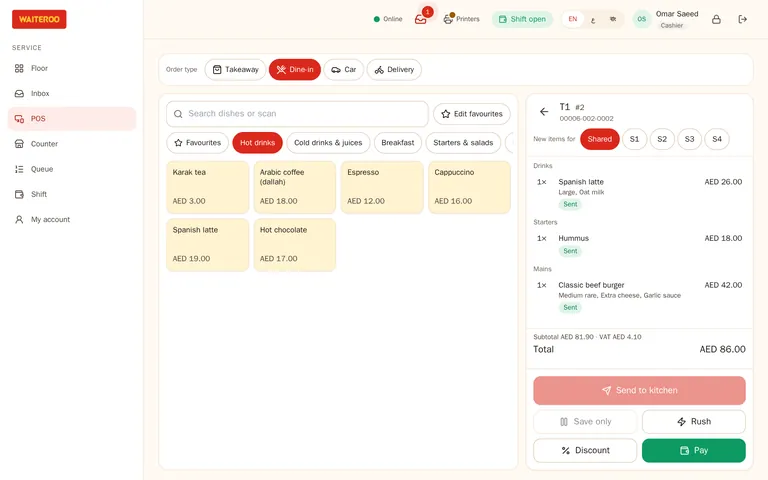
Every order says what it is
Dine-in, eat-in, takeaway, delivery, car-side, QR menu and kiosk orders are real order types, not pretend tables. The order type decides the price list, whether service charge applies, where the ticket prints and how the sale shows in your reports.
- Tabs that stay open — add rounds to a table’s tab until the guest asks for the bill.
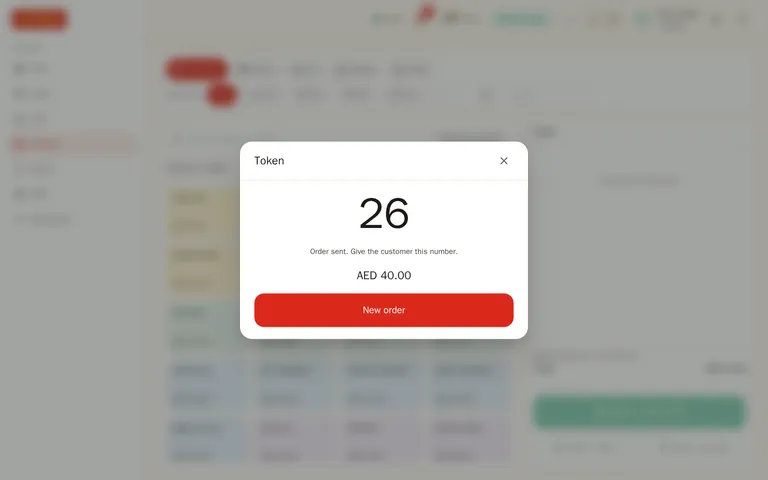
- Counter mode — the screen opens straight on the menu: order, pay or pay later, and a daily token number on the ticket.
- Park an order — keep a counter order waiting while the guest decides, and serve the next one.
- Scheduled orders — take an order now for a pickup time later today.
- Car-side orders — pick “Car” as the order type and type the plate. See the waiter app.
Set up for how you serve
Tell Waiteroo how each branch serves, and it switches on the matching order types; a new owner is asked once, at the first sign-in. The till then opens on the right screen: the floor plan for table service, the counter for quick service, or the order queue for delivery. Order types you switch off are refused everywhere, including the kiosk and the QR menu.
- Full service — tables, takeaway and pickup.
- Quick service / café — eat in, takeaway and pickup at the counter.
- Takeaway & delivery — takeaway, pickup and delivery, with no dining room.
- Drive-thru / car service — car-side, drive-thru and takeaway.
- Cloud kitchen — delivery only.
- Custom — tick the order types yourself, branch by branch.
- Eat in — a counter order eaten on site, with no table to pick. It follows the dine-in service charge and prices unless you give it its own prices.
Add-ons and combos without the slow menus
Common choices such as extra cheese or no onion sit right under the dish as one-tap buttons. Only required choices, like a size or a sauce, open a picker, and it moves through them one at a time.
- Combos — meal slots with included and extra-price choices, sizes and upgrades.
- Upsell prompts — “Make it a meal?” or “Add a drink?” at the right moment.
- Sold out — mark a dish or an add-on as sold out, or set how many are left.
More on the modifiers and courses page.
Get paid and give the right receipt
Cash, card or both
Mix payment methods on one bill. Orders close only when they are fully paid; anything short stays open and flagged.
Bilingual VAT receipts
The paid receipt is a tax invoice in English and Arabic with your TRN and the VAT amount. Refunds print a tax credit note.
WhatsApp receipts
Send the receipt to the guest on WhatsApp when they ask for it, instead of printing it.
Manager PIN
Discounts above a staff member’s limit, voids after firing and refunds need a manager PIN. Each approval is logged with who asked and who approved.
Revisit loyaltyComing soon
Link your Revisit account and guests will earn points on their paid bills.
Staff in their language
Each staff member works in English, Arabic or Bengali, on the same orders.
Shifts that close cleanly
Open the shift with a cash float, record every cash in and out with a reason, print an X report during the shift and a Z report at close. With blind close on, the cashier counts the drawer without seeing the expected amount.
Open late? Set the hour your business day starts, so sales after midnight count on the night they belong to.
See reports for everything the Z report shows.
Counter sales keep going offline
If the internet goes down, counter cash orders carry on with the saved menu. They show as “pending” and are sent as soon as the connection is back, without creating duplicates. Their kitchen tickets print as soon as the orders reach the server.
Table tabs, card payments, voids, refunds and closing the shift need the connection, so nothing is changed twice on two devices.
Questions and answers
Do I need special hardware?
Can one branch use both tables and a counter?
What happens if the internet goes down?
Is the receipt a tax invoice?
Try Waiteroo in your restaurant free for 14 days
No card needed. Set it up yourself or let our team do it, and ask us anything on WhatsApp.