The right dish to the right station, on paper or on screen
Each dish goes to its station: grill, fryer, bar, pastry. Print kitchen tickets, show orders on a kitchen screen, or both side by side. Waiteroo sends only what changed, so a second round never reprints the whole table.
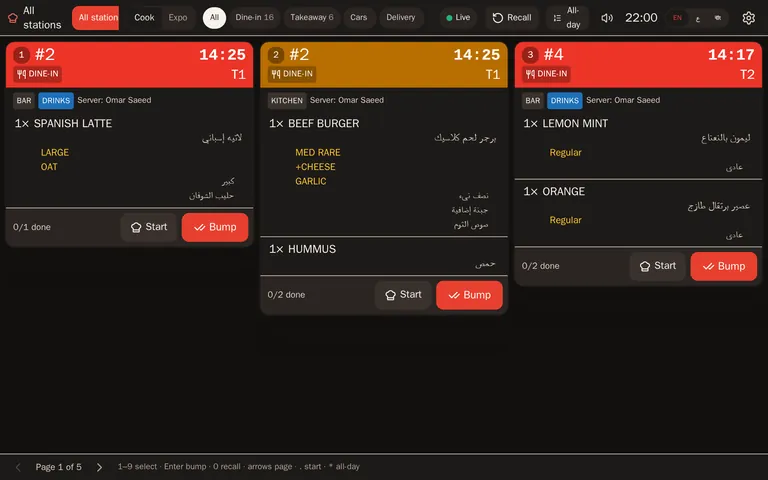
Tickets the kitchen can read
- Routed by dish or category — each station gets only its own items.
- Only what changed — a new round prints the new items; a void prints a VOID ticket.
- Everything on the ticket — order number, table or plate, server, course, seat, add-ons and notes.
- Large print — choose a bigger font per station.
- Arabic that prints properly — Waiteroo draws each ticket as an image, so Arabic letters join correctly on standard thermal printers.
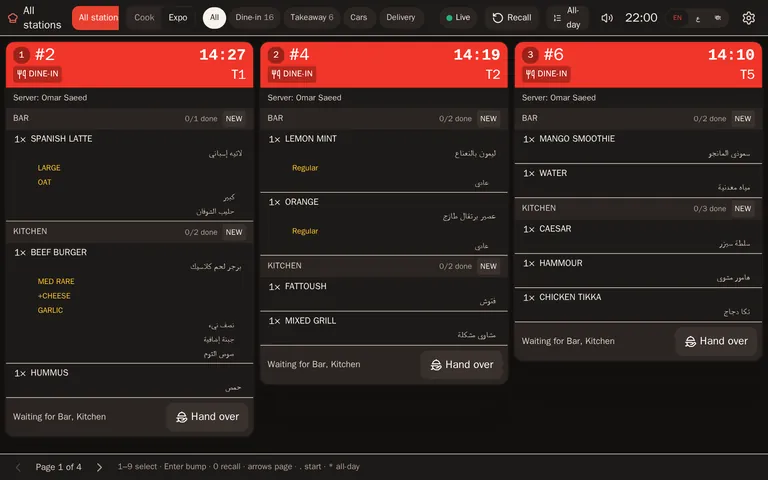
A kitchen screen for each station
- Oldest first — tickets in columns, with order type, table or plate, and server.
- Prep-time colours — green, then amber, then red against the target time you set per station.
- Tap and bump — tap a line when it is done, bump the ticket when it is ready, recall one bumped by mistake.
- Nothing missed — add-ons indented, notes and allergies highlighted, rush flagged, changed items struck through.
- All-day counts — how many of each dish are open across all tickets.
- Bump bar ready — works with a keyboard or a bump bar, and shows dish names in the station’s language.
An order-ready board at the counter
A screen at the pickup counter shows guests when their order number is ready. When the kitchen bumps the order, the number appears; for car orders, the waiter is told which car to go to.
How tickets print
Cloud-ready printers
Printers that collect their jobs over the internet print without any extra device in the shop.
In-shop print hubComing soon
an Android device in the shop that sends tickets to the network printers you already have.
From the browser
The till or a station computer prints to the printer installed on it.
Printed kitchen tickets are in every plan. Kitchen screens come with Pro and Premium, with no fee per screen.
Questions and answers
Can I keep printed tickets instead of a kitchen screen?
Will my current printers work?
Is there a fee per kitchen screen?
Does a printer problem stop the till?
Try Waiteroo in your restaurant free for 14 days
No card needed. Set it up yourself or let our team do it, and ask us anything on WhatsApp.