Quick service
Quick service: shorter queues, clear handover
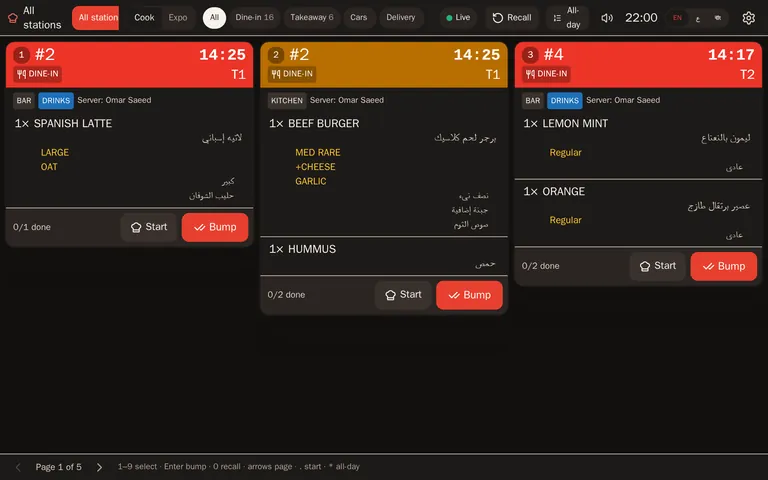
In quick service the counter is the bottleneck. Guests order at the kiosk or the counter, combos and upgrades take a few taps, the kitchen works from a screen, and the order-ready board tells guests when to collect.
Self-order kiosk Kitchen screens Order-ready board
Ordering
Two ways in: kiosk and counter
Guests who know what they want order at the kiosk in English or Arabic and pay at the counter. The cashier takes the rest on the counter screen.
- Combos — meal slots, sizes and upgrades in a few taps.
- Upsell prompts — “Make it a meal?” on the kiosk and at the till.
- Token numbers — every order gets a daily number.
- Eat in or take away — eat-in orders need no table, and the “Quick service / café” setup opens the till on the counter.
Kitchen
A kitchen that works from screens
- Prep-time colours — tickets turn amber, then red, against your target time.
- All-day counts — how many burgers are open right now, across all tickets.
- Bump — with a tap or a bump bar.
Handover
Guests know when to collect
When the kitchen bumps an order, its number appears on the order-ready board at the pickup counter.
Rush hour
Built for the busy hours
Sold out
Set how many are left; the kiosk, the till and the QR menu all stop selling at zero.
Menus by time
A breakfast menu in the morning, the full menu after.
Offline counter
Cash orders at the counter carry on when the internet drops.
Questions
Questions and answers
Which plan suits quick service?
Premium if you want the self-order kiosk, with no per-device fee for kiosks. Pro covers kitchen screens and combos without the kiosk. See pricing.
Can guests pay by card at the kiosk?
Not yet: paying at the kiosk is coming soon. For now guests pay at the counter; the order goes to the kitchen when it is paid, or straight away if you switch that on.
Is there a fee for the order-ready board?
No. The order-ready board has no per-device fee.
Try Waiteroo in your restaurant free for 14 days
No card needed. Set it up yourself or let our team do it, and ask us anything on WhatsApp.