Take the order at the table and send it straight to the kitchen
Waiteroo Staff opens in the browser on any phone or tablet, so there is nothing to download from an app store. Waiters sign in with their PIN, take the order with its add-ons and courses, and fire it to the kitchen from the table.
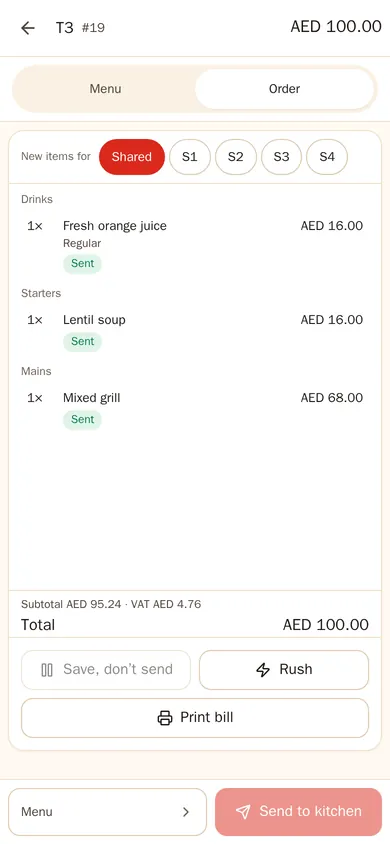
Everything a waiter needs, on one phone
- Tables — my section or the whole room, with the same live status as the till.
- Order — the full menu, one-tap add-ons, combos, seats and courses; hold or fire.
- My orders — what is ready to serve, course by course.
- Calls and alerts — QR waiter calls and food-ready alerts; tap to say “on my way”.
- Bill — print the guest check from the table.
- Shared phones — lock the phone and the next waiter signs in with their own PIN.
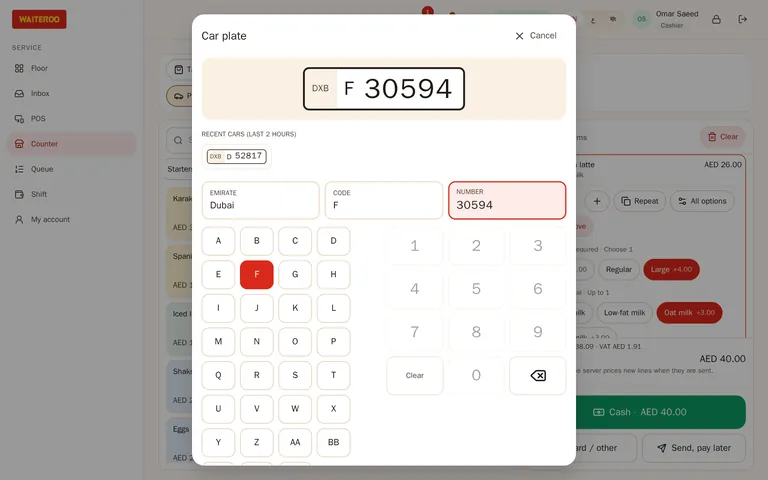
Orders for cars, by number plate
Many cafeterias serve the cars outside as much as the tables inside. Choose Car as the order type and type the plate in three fields: emirate, code and number. The plate prints on the kitchen ticket, shows on the kitchen screen and goes on the receipt, so the runner knows exactly which car to go to.
- Quick to enter — tap the emirate and the code, type the number on a keypad.
- Recent plates — cars from the last couple of hours are offered as suggestions.
- Colour and bay — add the car colour and the parking spot for the runner.
- Repeat cars — for a plate you have served before, see past orders and favourites. You can switch this off.
Plates are typed in for now. Scanning the plate with the camera in the Waiteroo Staff app is coming soon.
Staff phones without per-phone fees
Use the phones you have
Any recent phone or tablet with a browser. Add Waiteroo Staff to the home screen to open it like an app.
No fee per phone
On Pro and Premium, waiter phones and tablets have no per-device fee. You pay per POS till.
Each waiter’s language
English, Arabic or Bengali, chosen by each staff member.
Questions and answers
Do waiters need to download an app?
Is there a fee per waiter phone?
Can the waiter scan the number plate with the camera?
What does the kitchen see for a car order?
Try Waiteroo in your restaurant free for 14 days
No card needed. Set it up yourself or let our team do it, and ask us anything on WhatsApp.