Your QR menu, connected to the till and the kitchen
Every Waiteroo restaurant gets a digital menu on Waiteroo Online, with a QR code for each table. Guests scan, browse in English or Arabic and order. The order arrives at the till, staff accept it, and the kitchen starts.
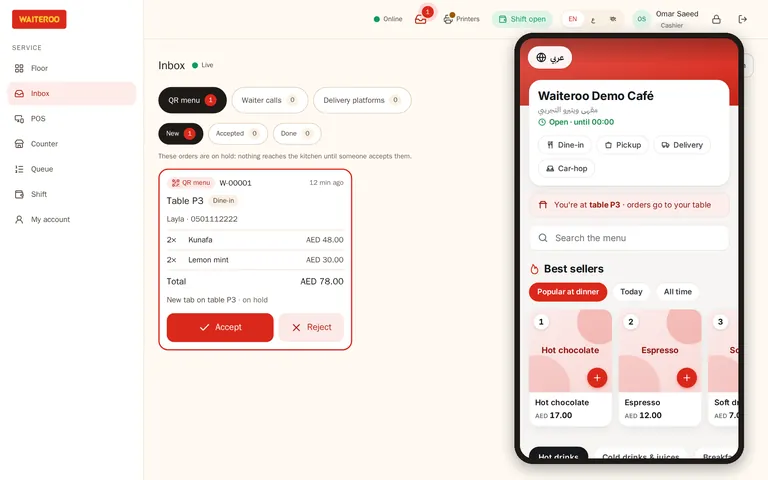
From the table to the kitchen
The menu opens in the phone’s browser. No app, no sign-up.
Dishes, quantities and a note for each dish.
It appears in the inbox with a sound, until someone accepts it.
The items join the table’s open tab and go to the kitchen. Or reject it with a reason.
At the table or the counter, on one bill with everything else.
By default every QR order waits for a staff member to accept it. A branch can switch on automatic acceptance.
Call the waiter, ask for the bill
Guests tap “Call waiter” or “Bill” on the menu. The table lights up on the floor plan and the waiter gets an alert on their phone.
A menu you control
Branch menus
Each branch can have its own menu and its own prices.
Sold out everywhere
Mark a dish sold out at the till and it shows on the QR menu too.
Best sellers
A best-sellers strip ranked from your own paid sales.
English and Arabic
Guests switch language on the menu.
Your look
Your logo, colours, contact details and opening hours.
Car orders
A guest ordering from the car park adds their car details, and the order arrives as a car order.
The QR menu and table ordering are in every plan. Waiter calls come with Pro and Premium.
Questions and answers
Do guests need to download an app?
Do QR orders go straight to the kitchen?
Can guests pick add-ons?
Is there a commission on QR orders?
Can I see a demo menu?
Try Waiteroo in your restaurant free for 14 days
No card needed. Set it up yourself or let our team do it, and ask us anything on WhatsApp.