Café POS: quick at the counter, easy at the tables
A café lives on speed at the counter and calm at the tables, and often serves the cars outside too. Waiteroo opens straight on the menu for counter orders, lets guests at the tables order from the QR menu, and takes car orders by number plate.
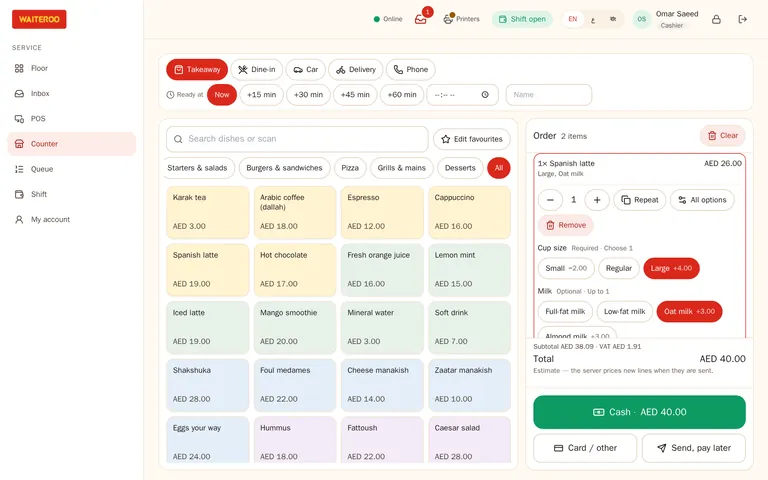
Counter orders in a few taps
- Straight to the menu — no table to pick; the order is takeaway or eat-in at the counter.
- Quick service / café setup — choose it for the branch and the till opens on the counter, with eat in, takeaway and pickup switched on.
- Add-ons as buttons — oat milk, extra shot, less sugar: one tap each.
- Pay now or later — and a daily token number on the ticket and the receipt.
- Park and continue — keep an order open while the guest decides.
Tables order from the QR menu
Guests on the terrace scan the table QR code and order from your Waiteroo Online menu. A barista accepts the order at the till, and it joins the table’s tab and goes to the bar.
Cars served by number plate
Choose Car as the order type and type the plate. The plate prints on the ticket for the bar and goes on the receipt, so the runner knows which car is waiting for its karak.
Plates are typed in for now; camera plate scanning in the Waiteroo Staff app is coming soon.
Small things that matter in a café
Keeps going offline
Counter cash orders carry on with the saved menu when the internet drops.
WhatsApp receipts
Send the receipt to the guest’s WhatsApp instead of paper.
Revisit loyaltyComing soon
Regulars will earn points on every paid bill through Revisit.
Questions and answers
Which plan suits a café?
Can one till serve the counter and the tables?
Do I need a kitchen printer?
Try Waiteroo in your restaurant free for 14 days
No card needed. Set it up yourself or let our team do it, and ask us anything on WhatsApp.