Fine dining
Fine dining POS: paced courses, calm service
In fine dining the timing is the service. Waiteroo lets waiters take the order at the table, hold the mains, and fire each course when the table is ready, while the floor plan shows the whole room at a glance.
Courses Floor plan Orders at the table
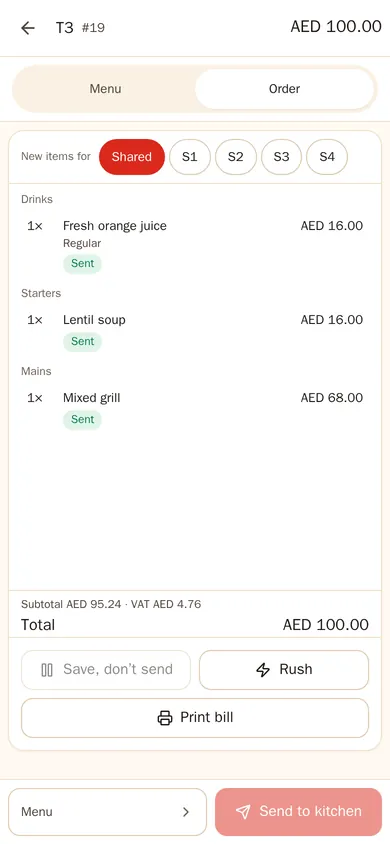
Courses
Each course when the table is ready
Starters go to the kitchen at once; mains wait on hold. When the table is ready, the waiter fires the next course with one tap, and the kitchen sees it in the right order.
- Seats — every dish on a seat, so it reaches the right guest and the bill splits cleanly.
- Notes and allergies — highlighted on the kitchen screen so they are not missed.
- Rush — when a guest is in a hurry, flag the dish.
On the floor
Orders taken at the table
Waiters carry the menu on their phone or a small tablet, with every add-on and course. The host sees on the floor plan which tables are seated, eating or ready for the bill.
- Live floor plan — status, time since seating and the server on every table.
- Waiter calls — a guest can call the waiter or ask for the bill from the QR menu.
The bill
A bill the table is happy with
- Split — by seat, by item, into equal shares or by amount.
- Service charge — added as its own line, removed only by a manager.
- Tips — recorded per server and kept out of sales.
- Pre-bill — marked “not a tax invoice”; the bilingual tax invoice prints after payment.
Questions
Questions and answers
Which plan suits a fine-dining restaurant?
Pro: courses, split bills, waiter phones and kitchen screens, with no fee per phone or screen. See pricing.
Can the kitchen see allergies clearly?
Yes. Notes and allergies are highlighted on the kitchen screen and printed on the kitchen ticket.
Can a guest be moved to another table mid-meal?
Yes. Move the tab to another table; the kitchen gets a note if the dishes were already sent.
Try Waiteroo in your restaurant free for 14 days
No card needed. Set it up yourself or let our team do it, and ask us anything on WhatsApp.