Every table, and every tab, at a glance
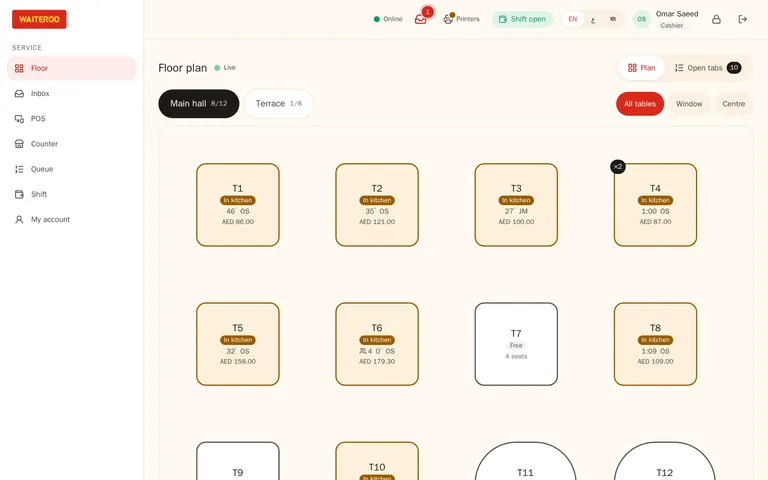
Draw your dining room once, floor by floor. From then on the floor plan shows which tables are free, which have ordered, where food is ready and who wants the bill. Tap a table to open its tab.
Know the room without walking it
Each table shows its state in colour, so the host and the cashier see the same room the waiters see.
- Status colours — free, seated, ordered, food ready, bill printed and waiter called.
- On every table — time since seating, the server and the running amount.
- Floors as tabs — main hall, terrace, family section or majlis, each with its own layout.
- Always current — every change goes through the server, so the counter tablet and the waiters’ phones show the same tab.
Tabs stay open until the guest pays
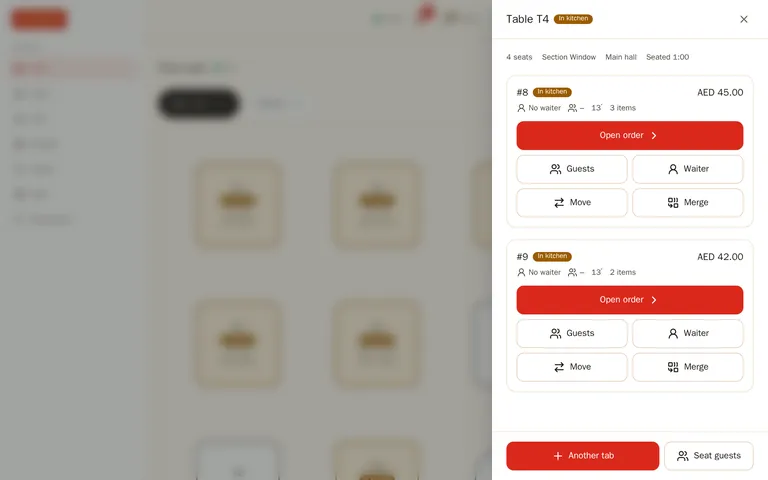
Add a second round, a dessert or a coffee to the same tab. A big group that wants separate bills can have several tabs on one table from the start.
- Move a table — move the whole tab to another table. If the kitchen already has the dishes, the stations get a “moved” note. To pay for some items apart, split the bill.
- Merge tables — join two tables into one bill and keep the history of both.
- Guests count — ask for the number of guests on every table, or switch the question off.
Lay out the room yourself
A manager can drag, resize and rename tables, set their shape and seats, and add floors at any time. The table QR codes for your Waiteroo Online menu use the same tables, so a QR order always lands on the right one.
The floor plan hears from the kitchen and the guests
Waiter calls
A guest taps “Call waiter” or “Bill” on the QR menu and the table lights up on the floor plan.
Food ready
When the kitchen bumps the order, the table shows food ready so the runner knows where to go.
QR orders join the tab
An accepted QR order is added to the table’s open tab, not a separate bill.
Questions and answers
Can one table have more than one bill?
Can I move guests to another table?
Do staff have to enter the number of guests?
Can a waiter and the cashier work on the same table?
Try Waiteroo in your restaurant free for 14 days
No card needed. Set it up yourself or let our team do it, and ask us anything on WhatsApp.