Know what sold, who sold it and where the cash went
Waiteroo reports follow your business day, not the calendar: if you trade past midnight, late sales count on the night they belong to. Reports are in English and Arabic.
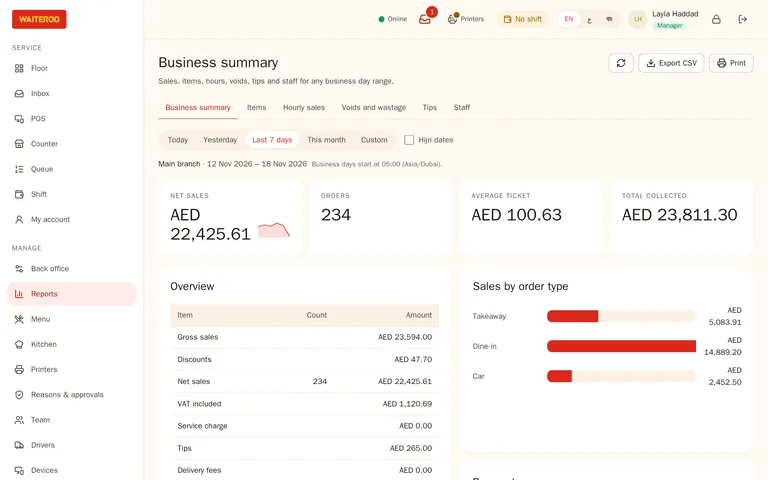
The reports you open every day
Items and categories
What sold, how many and for how much.
Hours and order types
When you are busy, and how much comes from dine-in, takeaway, QR, kiosk and delivery.
Payments
Cash, card and every other payment method, shift by shift.
Staff
Sales per staff member, and tips per server.
Voids and discounts
Each with its reason, who asked and who approved.
Export
Download reports as CSV to open in a spreadsheet.
X and Z reports without surprises
- Open with a float — and record cash in and out with a reason.
- X report — the shift so far, without closing it.
- Z report — sales by category, payment and order type, service charge, tips, discounts, voids, refunds and guests.
- Blind close — the cashier counts the drawer without seeing the expected amount; managers see the difference.
- Short payments stay visible — an order that is not fully paid stays open and flagged, never closed quietly.
Recipes and food cost (basic)Coming soon
Once recipes arrive, add a recipe to a dish to see its food cost. Ingredient use will be posted after the shift closes, so stock never holds up the till or the shift close. Recipes will come with Pro and Premium.
All your branches in one report
On Premium, owners see every branch side by side and switch between them without signing in again.
Questions and answers
Can I see reports from my phone?
Can I export reports to Excel?
Does the Z report count sales after midnight?
Try Waiteroo in your restaurant free for 14 days
No card needed. Set it up yourself or let our team do it, and ask us anything on WhatsApp.