Cloud kitchen POS: every order, one kitchen
A cloud kitchen only delivers. Choose the “Cloud kitchen” setup and the till opens on the order queue, every order reaches the same kitchen screen, and your drivers settle their cash at the end of the shift. Delivery-app channels with their own prices and payout report are coming soon.
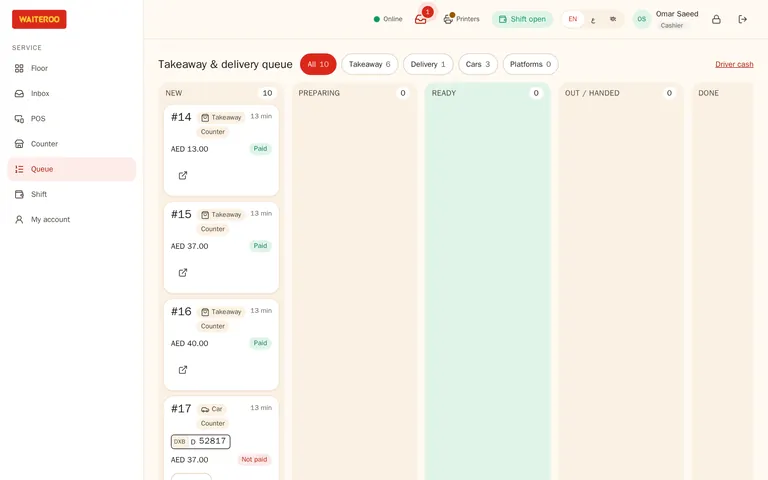
A till made for delivery only
The “Cloud kitchen” setup offers delivery orders only. The till opens on the order queue instead of a floor plan, and order types you do not offer are refused everywhere.
- Channel menus — different menus or prices per channel and time of day.
- Sold out — mark a dish sold out once.
One kitchen screen for every order
Every order reaches the same stations, oldest first, with the order number and type on each ticket.
- Prep-time colours — so late orders stand out before the rider arrives.
Your own drivers
Assign a driver, follow each order out and delivered, and settle each driver’s cash on delivery at the end of the shift.
Each delivery app as its own channelComing soon
- Prices per app — a price list for each delivery app.
- Reference and locked total — the app’s order number on everything, and a total that matches the app.
- Commission and settlement — see what each app keeps, and check every payout.
Automatic delivery-app orders are coming soon too.
Questions and answers
Do delivery-app orders come in automatically?
Which plan suits a cloud kitchen?
Can I see sales by order type?
Try Waiteroo in your restaurant free for 14 days
No card needed. Set it up yourself or let our team do it, and ask us anything on WhatsApp.