Self-order kiosk
Let guests order themselves at the kiosk
A self-order kiosk takes the queue off the counter at busy times. Guests choose in English or Arabic, build their meal with add-ons and combos, and get a token number. The order goes to the till and the kitchen.
Self-order kiosk English and Arabic Combos and upgrades
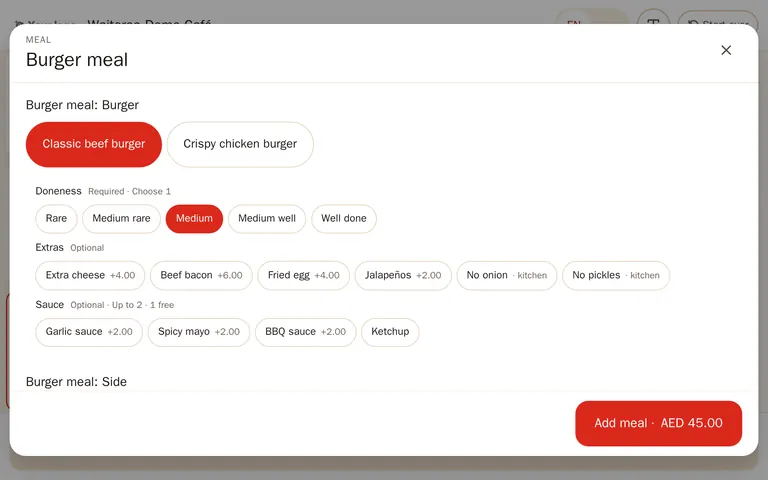
The guest’s side
How a kiosk order works
Pick a language
English or Arabic.
Dine in or take away
The kiosk asks first, so the kitchen packs it right.
Choose the food
Categories with best sellers first, add-ons and combos, and a suggested drink or meal upgrade.
Check the order
Edit the cart, then add a name.
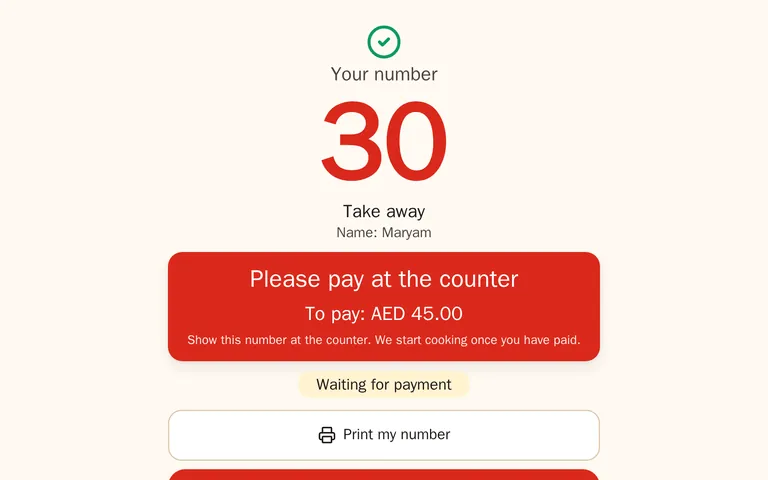
Pay at the counter
The guest gets a token number on screen and on a printed slip.
In the restaurant
Runs on a tablet in a stand
The kiosk runs full screen in the browser. A manager pairs the tablet once from the back office; the kiosk keeps a device key, never a staff login.
- Resets itself — after a short time without a tap, it asks “Still there?” and then clears the order.
- Easy to read — a large-text option for the whole order.
- Staff exit — only with a manager PIN.
- Into the kitchen — orders appear in the POS queue as kiosk orders and go to the kitchen once paid, or straight away if you choose.
Payment: guests pay at the counter for now. Paying at the kiosk itself is coming soon.
Questions
Questions and answers
Can guests pay by card at the kiosk?
Not yet: paying at the kiosk is coming soon. For now guests pay at the counter, and the order goes to the kitchen when it is paid, or straight away if you switch that on.
Which plan includes the kiosk?
Premium. A self-order kiosk is not billed as a POS till, so there is no per-device fee for it. See pricing.
What hardware do I need?
A tablet in a stand with the kiosk opened full screen in the browser, and a receipt printer for the token slip. On an Android tablet, screen pinning keeps guests inside the kiosk.
Try Waiteroo in your restaurant free for 14 days
No card needed. Set it up yourself or let our team do it, and ask us anything on WhatsApp.