Add-ons in one tap. Courses in the right order.
Most orders come with changes: extra cheese, no onion, large, spicy. Waiteroo puts the common choices right under the dish, so staff tap once, and opens a step-by-step picker only when a choice is required.
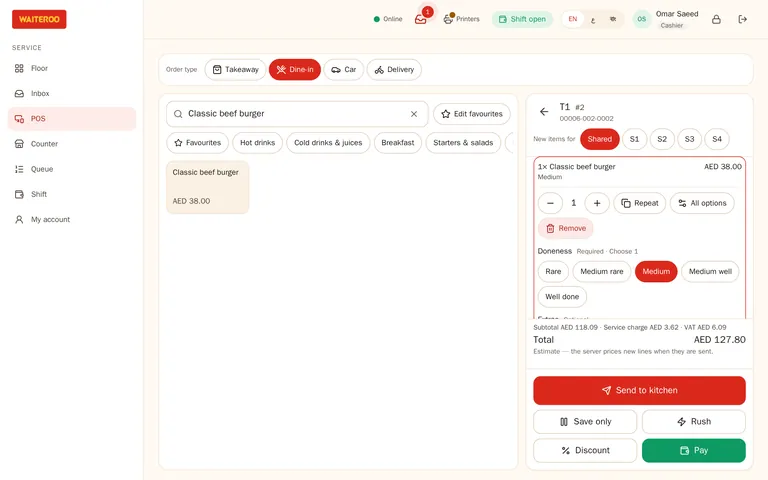
Modifiers that keep up with the rush
- Optional add-ons — one-tap buttons under the dish, with a quantity if needed.
- Required choices — size, bread or sauce open a picker that moves through each group in turn.
- Your rules — a price per choice, a minimum and maximum per group, and defaults.
- No, less, extra — plus ready-made kitchen notes per category and free text.
- Same as last — repeat the previous item’s choices for the next one.
- Half and half — two toppings on one pizza, priced the way you set.
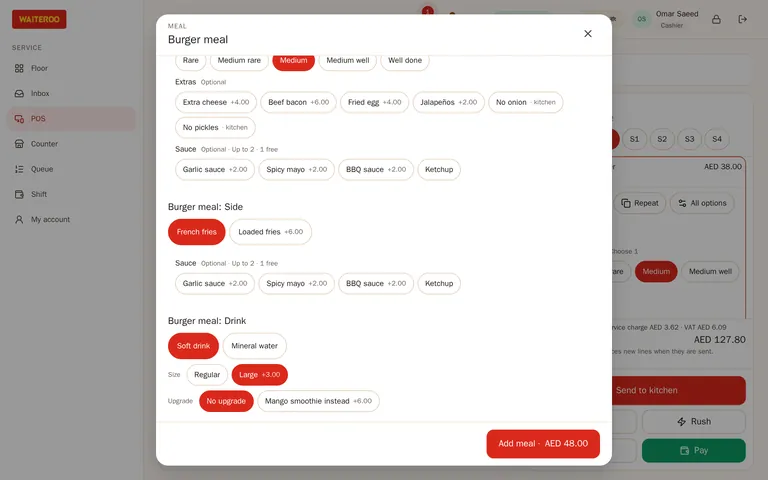
Combos with sizes and upgrades
Build a meal from slots, such as main, side and drink, with included choices and choices that cost extra. A size or a meal upgrade is one tap.
- Clear tickets — combo items print under their meal on the kitchen ticket and the kitchen screen.
- Upsell prompts — “Make it a meal?” or “Add a drink?” where you set it.
Courses fired when the table is ready
Starters, mains and desserts, or your own courses, set by category. The waiter sends the starters and holds the mains; one tap fires the next course when the table is ready.
- Hold and fire — send all unsent items now, or a held course later.
- Rush — flag an item so the kitchen sees it first.
- Changes after firing — reducing or voiding an item the kitchen already has needs a reason, and a manager PIN if you set it. The station gets a VOID ticket.
Sold out, and the right menu at the right time
Sold-out counts
Mark a dish or an add-on as sold out, or set how many are left. The till, the kiosk and the QR menu all show it.
Menus by time and channel
A breakfast menu in the morning, and different prices for delivery than for dine-in.
Kitchen names
Give a dish a short kitchen name and an Arabic name; each station prints the language it reads.
Questions and answers
Can guests choose add-ons on the QR menu?
Do modifiers show on the kitchen ticket?
Which plans include courses?
Try Waiteroo in your restaurant free for 14 days
No card needed. Set it up yourself or let our team do it, and ask us anything on WhatsApp.