Order from your suppliers and receive into stock
Keep each supplier with the ingredients they sell and their prices. Order for a branch, send the order by e-mail or WhatsApp, and when the delivery comes, check it in on a phone: the stock goes up and any price change is flagged.
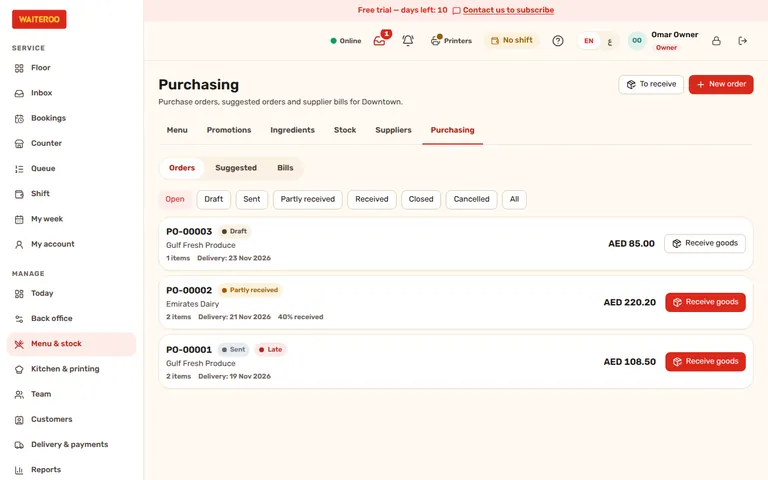
A purchase order for each branch
Pick the supplier and the branch, add the items from what that supplier sells, and the order fills in their price. Send it as a PDF by e-mail, share it on WhatsApp from your own phone, or mark it as sent after a phone call.
- Suppliers — contact details, payment terms and the ingredients each one sells, in their unit and at their price.
- Suggested orders — set an “order up to” level per ingredient and Waiteroo suggests what to order, after what is already on order.
- What is waiting — orders to receive, low stock with no order and bills past their due date appear on the Today to-do list.
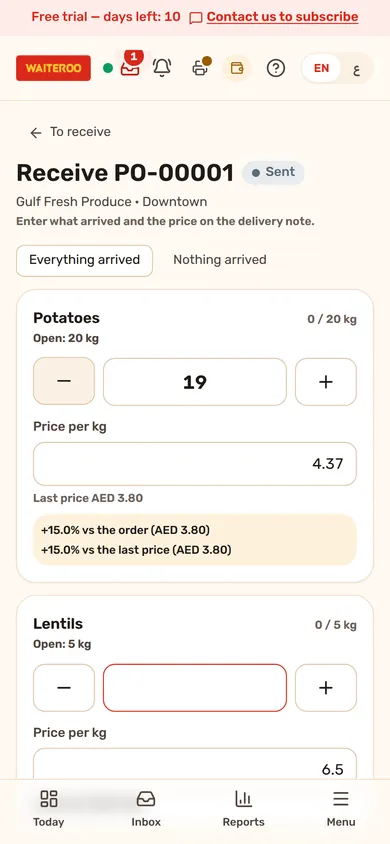
Check in the delivery on a phone
When the delivery arrives, open the order on a phone and enter what came and the price on the delivery note. Part deliveries are fine; the rest stays open. The ingredient stock goes up at once, and the delivery price becomes the ingredient’s cost unless you switch that off.
- Price warnings — a price 10% or more away from the order or the supplier’s last price is flagged. You set the percentage, and a warning never stops the delivery.
- Into recipes and food cost — received stock feeds the same ingredient stock and food cost as your recipes.
Supplier bills and what is due
Record the supplier’s bill against the order: its number, the amount and the due date from the supplier’s payment terms. VAT is added only when your business is VAT registered. Mark bills as paid and see what is still due. Bills are kept as a list for you to follow up; they are not posted to accounts.
Questions and answers
Which plans include purchasing?
Can managers order for any branch?
Does a price change stop the delivery?
Related
Try Waiteroo in your restaurant free for 14 days
No card needed. Set it up yourself or let our team do it, and ask us anything on WhatsApp.