Bookings on your floor, gift cards at your till
Take bookings by phone or let guests book online, see the day on a timeline of your tables and seat each party with one tap. Walk-ins go on the waitlist with an estimated wait. On Premium, sell gift cards and take them as payment.
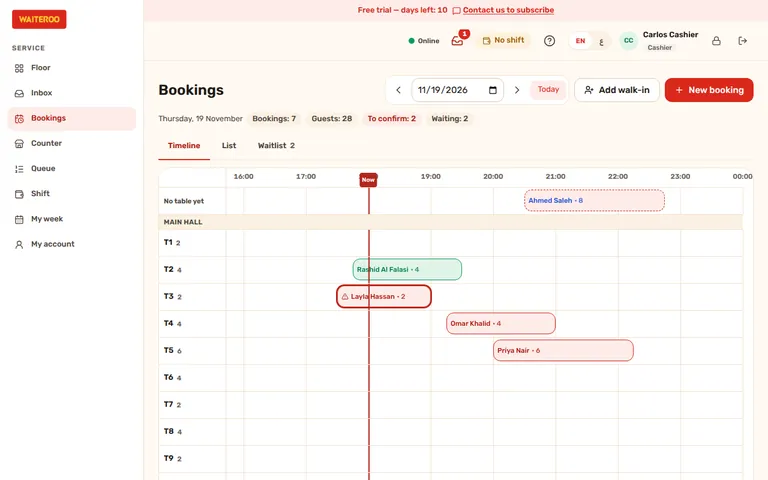
The day’s bookings on a timeline of your tables
The Bookings screen on the till shows every booking of the day against your tables, with the time now marked. Take a booking for a phone call or a guest at the door, pick the table now or later, and give a big party two tables. When the guests arrive, Seat opens the table’s order; the booking is complete when that bill is paid.
- No double booking — two bookings can never get the same table at the same time, even when they are made at the same moment.
- Your rules — booking hours for each day of the week, how long a table is kept for each party size and an optional gap between bookings.
- Late and no-shows — a booking that has not arrived is marked late; after your grace time staff can mark it as a no-show.
- Your choice — off until a manager switches bookings on for the branch. Bookings come with Pro and Premium.
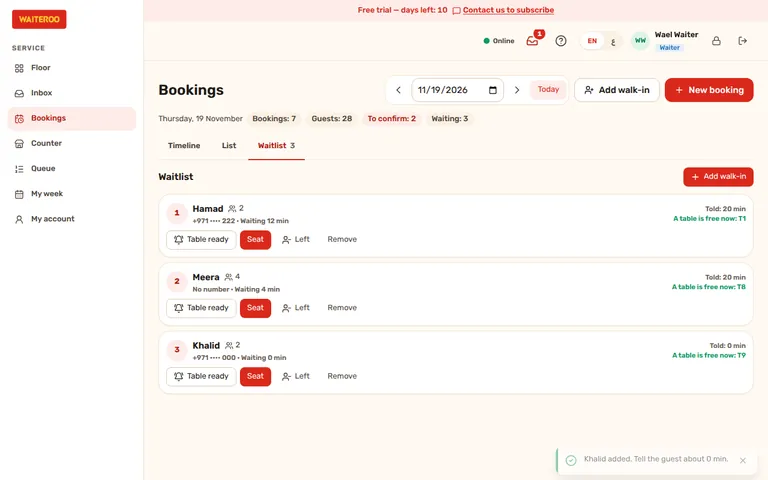
A waitlist for walk-ins
No table free? Add the party to the waitlist. Waiteroo estimates each party’s wait from the tables in use and the bookings still to come, shows which table frees up first, and staff seat them in order.
- Table ready — tell the guest their table is ready with one tap, by WhatsApp when your number is linked and the guest agreed to messages.
- The wait you told them — the waitlist keeps the wait each party was told next to the time they have waited so far.
Let guests book online
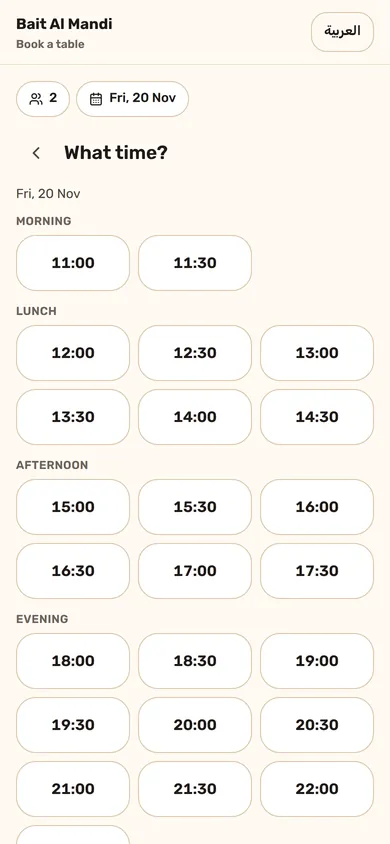
Switch on your booking page and share its link or QR code. Guests pick the party size, the day and a free time; the QR menu also shows a “Book a table” button. To confirm the booking, the guest sends a short code from their phone to your restaurant’s WhatsApp number, so you know the number is real.
Confirm online bookings automatically or approve each one. Only tables you mark as bookable online are offered, and you set how far ahead and how large a party can book online. Guests can cancel online until the time you allow.
- Confirmations and reminders — sent by WhatsApp from your linked number, only to guests who agreed to messages from you.
- English and Arabic — the booking page is in both languages.
- DepositsComing soon — a deposit paid online when the guest books, on Premium.
Sell gift cards and give store credit
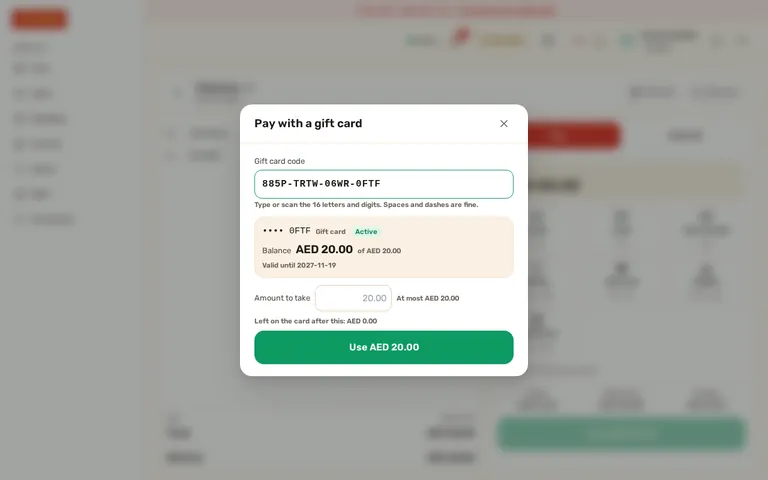
Sell a gift card at the till for cash or card, in the amounts you choose. The receipt prints the card’s code once; after that only its last four characters are shown. Guests pay all or part of a bill with the card, and what is left stays on it. A refund can go back onto a card as store credit.
In the back office you see every card, its balance and history, and what is still owed on all cards together. A card can be blocked, and cards expire after 12 months by default; you choose the validity.
- Safe codes — after five wrong codes in 15 minutes, checking codes is locked for a while.
- At the kiosk and the car — guests can pay with a gift card at the self-order kiosk when you switch it on, and waiters take gift cards for car orders on their phone.
- In the reports — the X and Z reports show what was sold and paid with gift cards, and the card list exports to Excel.
- Your choice — off until the owner switches gift cards on. Gift cards come with Premium.
Questions and answers
Which plans include bookings?
How does a guest book online?
Do I need a linked WhatsApp number for bookings?
Can a gift card pay for part of a bill?
Try Waiteroo in your restaurant free for 14 days
No card needed. Set it up yourself or let our team do it, and ask us anything on WhatsApp.