Your menu in Arabic and English, from the till to the kitchen
Your guests read Arabic or English, and so does your team. In Waiteroo every dish can carry its name and description in both, and each person sees their own language: the cashier, the waiter, the guest at the kiosk and the guest on the QR menu. A quick note tapped in Arabic reaches the kitchen in both languages.
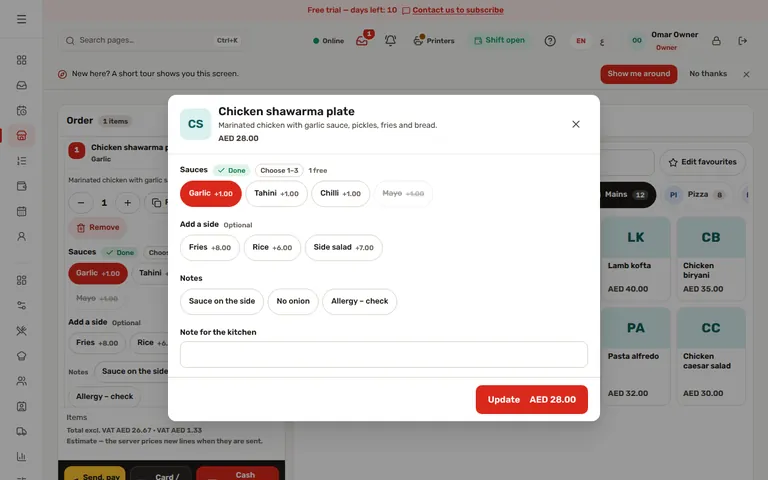
Tell every guest what is in the dish
In Menu › Dishes, write the English and the Arabic description side by side. Your Excel menu file has a “Description in Arabic” column too, and the ready menus fill both languages for you.
When a dish opens its options on the till or a waiter’s phone, its description shows under the name in that person’s language, or in the other one if only one is written. Staff can answer “what is in it?” without going to the kitchen.
Notes the counter and the kitchen both read
Each quick note, such as “No onion” or “No ice”, has an English and an Arabic text. Staff see the buttons in their own language, and a tapped note goes into the kitchen note in both: “No onion / بدون بصل”. Whoever reads the ticket or the kitchen screen understands it.
- Set once per category — quick notes pass down to sub-categories, so one list serves a whole section of the menu.
- Prints properly — Waiteroo draws each kitchen ticket as an image, so Arabic letters join correctly on standard thermal printers.
Guests read the menu in their language
QR menu
On the Arabic menu, guests read the Arabic description; on the English menu, the English one. A menu with no Arabic descriptions yet keeps showing the English ones.
Self-order kiosk
Two lines under each dish, in the language the guest picked, with an info button for the full description. On Premium.
Receipts
Bilingual receipts and tax invoices in English and Arabic.
Staff screens
Each staff member works in English or Arabic, on the same orders.
Questions and answers
Do I have to write every description in both languages?
Does the kitchen see notes in Arabic or English?
Which plans include Arabic menus?
Try Waiteroo in your restaurant free for 14 days
No card needed. Set it up yourself or let our team do it, and ask us anything on WhatsApp.